
This recipe helps CRM owners find friends who joined a while ago but haven't interacted recently, and send them a welcome-back gift, without bothering people who were active lately or just joined.
Who this is for
- CRM owners whose friend count keeps growing while many people go quiet after joining, and who want to win them back regularly.
- Brand marketers with a welcome-back budget who want it to reach people who've actually drifted away, not regulars.
When you're done you'll have a self-expiring "Active in last 90 days" tag, automatic tagging on your common chatbots and links, a reusable advanced filter, and an article with a welcome-back pass.
The example below is the skincare brand "Sunleaf". Every setting was actually created in the OakMega manual demo workspace, and the article was really sent to a test member's LINE with Test Publish.
First: there's no "last interaction time" filter
Member filters offer contact information, each platform's data (for LINE: ID, name, Join Time, block time and messaging status), strength tags, expiry tags, tagging time and custom fields. There is no "last interaction time". So this recipe records interaction itself:
| You want to know | How |
|---|---|
| Who interacted recently | Apply the expiry tag "Active in last 90 days" when members trigger a chatbot, click a deep link or read a post |
| Who has been inactive for a long time | The expiry tag drops off automatically if it isn't applied again within 90 days; anyone without it hasn't done any of those things in 90 days |
| Who just joined and isn't "lost" yet | Exclude friends whose LINE Join Time is within the past 90 days |
Limitation: only interactions you've set up to tag are recorded. A message that doesn't trigger any chatbot, or a purchase in store, leaves no tag. In the first 90 days after you start, tags are still accumulating and the list will be too large; wait for one full cycle before sending.
Features you'll use
| Feature | Role in this scenario | Minimum plan | Needs activation? |
|---|---|---|---|
| Tag Management | The expiry tag "Active in last 90 days" and the strength tag "Welcome-back gift used" | All plans (Free: up to 10 tags, no folders) | No |
| LINE chatbot | Applies "Active in last 90 days" when triggered | All plans | No |
| Deep Link, post Read Tracking | Apply the same tag on link clicks and reads | All plans | No |
| Pass | The welcome-back gift, put straight into wallets with "Admin distributes" | Enterprise | Yes |
| Post Article | Finds dormant members with an advanced filter and sends a text message plus the pass | All plans | No |
Because it uses a pass, the whole setup needs the Enterprise plan; without the pass, any plan can do it.
Flow
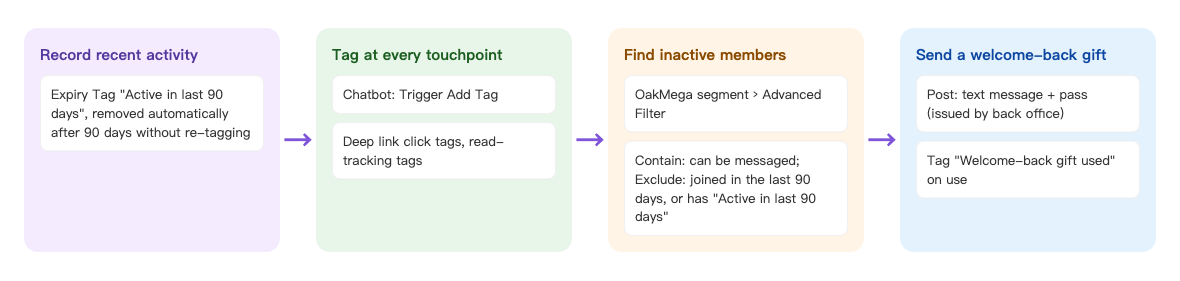
- Create a tag "Active in last 90 days" with a 90-day expiry.
- Apply it at every touchpoint — chatbots, deep links, post read tracking. Each interaction restarts the clock.
- When posting, use an advanced filter: contain friends who can be messaged; exclude those who joined in the past 90 days or have "Active in last 90 days".
- Add a text message and the welcome-back pass. When members use the pass they're tagged "Welcome-back gift used", so you can measure the result.
How to set it up
| Step | Where | Settings in this scenario |
|---|---|---|
| 1. Create the expiry tag | Member & Tag › Tag Management | Folder "Win back inactive members": expiry tag "Active in last 90 days" (90 days), strength tag "Welcome-back gift used" |
| 2. Tag at touchpoints | LINE › Chatbot; Link Tool › Deep Link; Post Article | Set "Active in last 90 days" in Trigger Add Tag, Click to apply tags and post-read tagging |
| 3. Add the welcome-back pass | Web-based Tool › Pass | Admin distributes, 300 in total, usable within 14 days of receiving, tag "Welcome-back gift used" on use |
| 4. Filter dormant members and post | LINE › Post Article | OakMega segment › Advanced Filter; text message + pass |
| 5. Test, then publish | LINE › Post Article | Send to message test members first, then publish now or schedule |
1. Create the expiry tag
Under Member & Tag › Tag Management, add a folder "Win back inactive members" and add a tag:
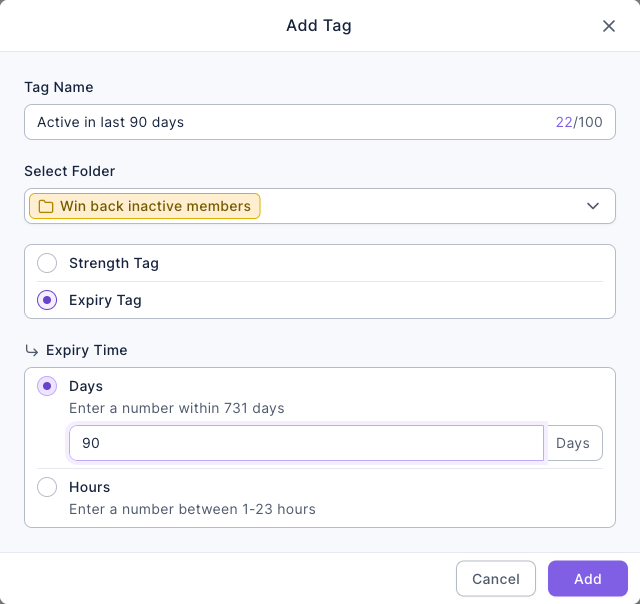
- Set Tag Name to "Active in last 90 days".
- Choose Expiry Tag, and under Expiry Time choose Days and enter 90.
- Click Add. Then add a strength tag "Welcome-back gift used".
The expiry counts from the last time the tag was applied to that member; applying it again within the period restarts the clock. The system checks for expired tags once an hour, so removal can lag slightly. See Create and manage tags.
The image below is the Add Tag dialog: tag name "Active in last 90 days", folder "Win back inactive members", tag type Expiry Tag and an expiry time of 90 days.
2. Tag at touchpoints
Set every place members usually interact to apply "Active in last 90 days":
| Touchpoint | Where to set it |
|---|---|
| Chatbots (keyword, event-triggered, default reply) | Trigger Add Tag in the chatbot settings |
| Deep links (product or campaign pages) | Click to apply tags |
| Posts | Turn on Read Tracking and tag readers after publishing |
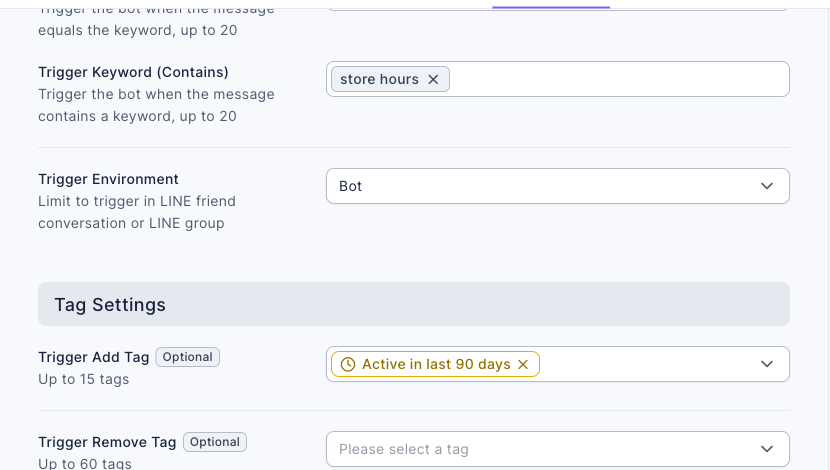
The demo adds a keyword chatbot "Store hours": when a friend's message contains "store hours", it replies with the opening hours and applies "Active in last 90 days". The image below is its settings tab: Trigger Keyword (Contains) is "store hours" and Trigger Add Tag has the expiry tag "Active in last 90 days" with its clock icon.
For chatbots and deep links you already use, edit them and add this tag to the same field (up to 15 tags per field). See Set up a LINE chatbot and Create a deep link.
3. Add the welcome-back pass
Under Web-based Tool › Pass, add a folder "Win back inactive members" and a pass "NT$150 welcome-back gift":
- Enter the name and description and upload an image.
- Set Distribution type to Admin distributes; posts put this kind of pass straight into members' wallets, with no claiming needed.
- Set Total pass quantity to 300.
- On Usage settings, set Usage period to Within N days of receiving with 14, and Apply tag on use to "Welcome-back gift used".
- Click Save and confirm.
A post's pass message can only use admin-distributed passes that aren't public in the wallet. See Send passes (coupons).
4. Filter dormant members and post
Under LINE › Post Article, create a post "Long time no see: NT$150 welcome-back gift":
- Set audience source to OakMega segment, audience setting to Advanced filter, and click Set advanced filter.
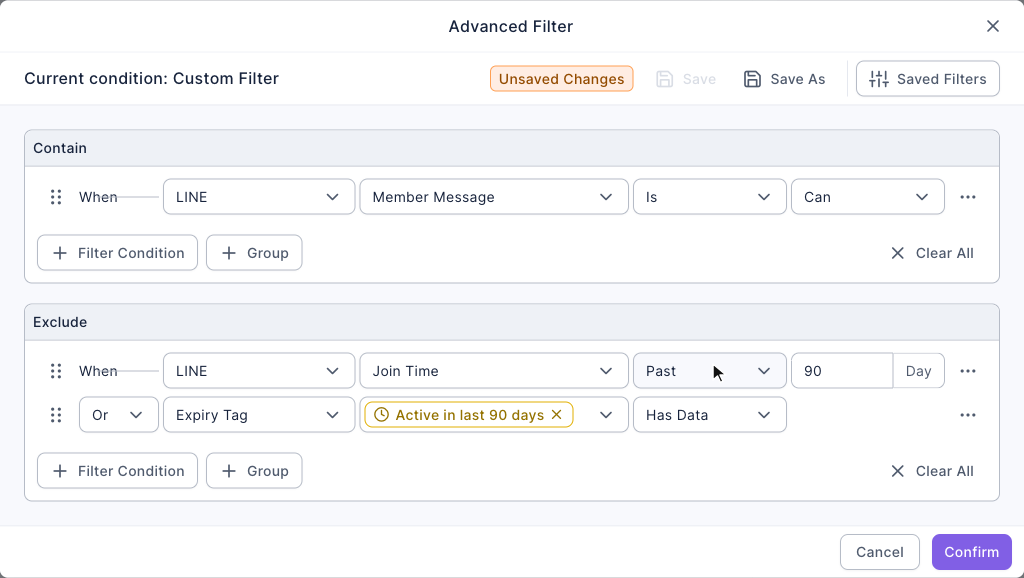
- Under Contain, click Filter Condition: Item LINE, Sub-type Member Message (the messaging status), condition Is, value Can — only friends who can still receive messages.
- Under Exclude, click Filter Condition: Item LINE, Sub-type Join Time, condition Past, 90 days — people who just joined aren't lost yet.
- Click Filter Condition under Exclude again, keep the connector Or: Item Expiry Tag, choose "Active in last 90 days"; the condition fills in Has Data automatically. Click Confirm.
- Under messages, add a Text Message explaining the gift, then a Pass message with "NT$150 welcome-back gift".
The animation below shows step 4: it adds a row under Exclude, picks "Expiry Tag" as the item, ticks "Active in last 90 days" in the tag menu and clicks "Add 1 tags", and the condition changes to "Has Data".
The image below is the finished advanced filter: contain "LINE Member Message Is Can"; exclude "LINE Join Time Past 90 days" or "Expiry Tag Active in last 90 days Has Data". Once it's set, click Save As to keep it as a saved filter you can load next month.
Always add a text message: a pass message in a post doesn't notify the member — the editor even says "Pass does not include a message notification" — so the pass just appears quietly in the wallet. The text message tells members it's there.
The demo workspace has only one test friend, who joined recently, so the audience shows 0 (excluded by "joined in the past 90 days"). That's the correct result.
5. Test, then publish
- Click Test Publish and choose your message test members (set them up first in Set up message test members), then check what arrives.
- Check that the number in "audience / remaining message quota" on the right makes sense, then publish now or schedule.
- To win back members every month, copy the post monthly and load the saved filter. For people who've already had a gift, add "Welcome-back gift used" to the exclusions or use a new pass.
What members see
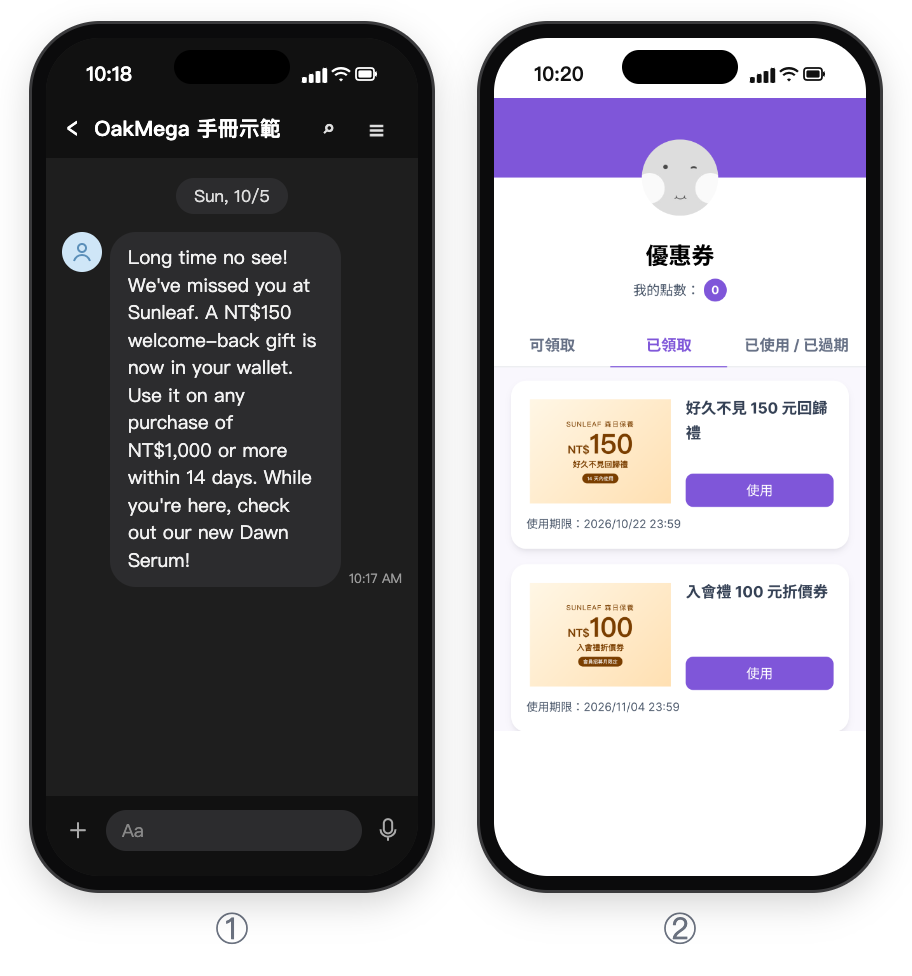
① Dormant members receive the post's text message in LINE: "Long time no see! We've missed you at Sunleaf. A NT$150 welcome-back gift is now in your wallet. Use it on any purchase of NT$1,000 or more within 14 days. While you're here, check out our new Dawn Serum!" The pass itself doesn't send a notification, so this text is the only message in the chat.
② When they open the wallet, the gift is already on the Claimed (已領取) tab, with no need to claim it. Below it are the usage period (14 days from receiving) and a Use (使用) button. The wallet screen is from the Chinese demo.
| Member | Situation | Do they receive it? |
|---|---|---|
| Joined over 90 days ago, no chatbot or link activity in 90 days | Dormant | Gets the text message; the gift appears in their wallet |
| Joined over 90 days ago, asked about store hours last week | Has "Active in last 90 days" | No |
| Joined last month | Join Time within the past 90 days | No |
| Has blocked the official account | Messaging status "Can't" | No |
How to check it's working
| What you want to know | Where to look |
|---|---|
| How many people the win-back reached | LINE › Post Article: this post's audience and open rate |
| How many came back and interacted | A week or two later, check whether they were tagged "Active in last 90 days" again (for example, an advanced filter containing that tag) |
| How many used the gift | Web-based Tool › Pass: used count, or the number of people tagged "Welcome-back gift used" |
| Long-term churn | Record the filter's audience size each month and see whether dormant members grow or shrink |
Variations
- Tiered win-back: add a 180-day expiry tag and send a small gift to people inactive for 90–180 days and a bigger one beyond 180 days.
- Ask before you give: start the post with a "What are you looking for lately?" menu whose buttons trigger chatbots; people who tap are tagged "Active in last 90 days" again, then send the pass to those who didn't.
- Use other signals: if you use OakMega forms or the booking center, apply the same expiry tag on submissions and bookings too.