
This recipe helps support supervisors catch complaints on LINE the moment they arrive. When a member mentions a complaint, a refund, a return or an allergy, they immediately get a reply with an apology and a response time. At the same time the conversation is tagged and sent straight to a support supervisor, so it doesn't sit in the queue with routine questions.
Who this is for
- Support supervisors: complaints get mixed in with routine questions. By the time an agent spots one and passes it up, half a day has gone by and the customer is even angrier.
- The brand's CRM manager: you want to know how many complaints come in each month and whether they've been resolved.
When you're done you'll have a chatbot that catches complaint keywords, a pair of "needs supervisor" and "resolved" tags, an organization that only takes complaints, and a way for supervisors to find complaints that slipped through.
The examples use a fictional skincare brand, Sunleaf. The tags, the organization and the chatbot were all actually created in the OakMega manual demo workspace. The Service Center conversation is a demo recreated from the real message format.
Features you'll use
| Feature | Its job in this scenario | Minimum plan | Needs activation? |
|---|---|---|---|
| LINE chatbot | Catches complaint keywords: replies with an apology, applies a tag and transfers to Service Center | All plans | No |
| Tag Management | "Complaint: needs supervisor" decides who gets the conversation; "Complaint: resolved" records that it's closed | All plans (Free: up to 10 tags) | No |
| Organizations and assignment rules | The "Complaints team" uses its assigned tag to take only complaints | All plans | Agent seats are activated separately |
| Automatically close resolved conversations | Closes the conversation once resolved and moves it back to the default organization | All plans | Agent seats are activated separately |
Flow
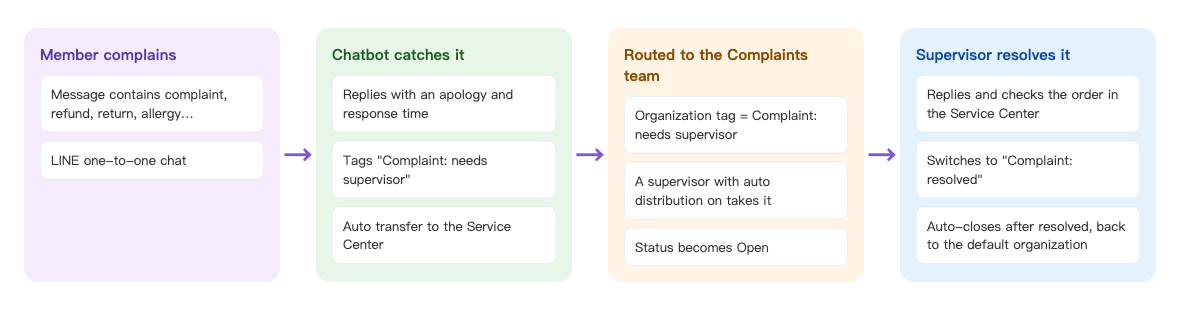
- A member's message on LINE contains a keyword such as complaint, refund, return or allergy.
- The chatbot replies with an apology and a response time, applies "Complaint: needs supervisor" and transfers the conversation to Service Center.
- The "Complaints team" has "Complaint: needs supervisor" as its assigned tag, so the conversation goes to this team and a supervisor in it picks it up.
- When the supervisor has dealt with it in Service Center, they switch the tag to "Complaint: resolved" and mark the conversation Resolved, and the service closes automatically.
How to set it up
| Step | Where | Settings in this scenario |
|---|---|---|
| 1. Create tags | Member & Tag › Tag Management | Folder "Complaints": Complaint: needs supervisor, Complaint: resolved |
| 2. Create the Complaints team | Service Center › Service Center Setting › Organization | Add the supervisors and turn on auto distribution; assigned tag "Complaint: needs supervisor"; close automatically 24 hours after resolved, then change to the default organization |
| 3. Create the chatbot | LINE › Chatbot | "Trigger Keyword (Contains)": Complaints, complaint, refund, return, allergy, compensation; Trigger Add Tag; Service center transfer |
| 4. Supervisors check once a day | Service Center | Filter by the Complaints team; use the advanced filter to find complaints that landed in other organizations |
1. Create the complaint tags
Under Member & Tag › Tag Management, add a folder named "Complaints" with two Strength Tag tags:
| Tag | What it's for |
|---|---|
| Complaint: needs supervisor | Applied automatically by the chatbot; it's how the Complaints team picks up the conversation |
| Complaint: resolved | Applied by hand when the supervisor closes the case, removing "needs supervisor" at the same time |
2. Create an organization that only takes complaints
Under Service Center › Service Center Setting, open the Organization tab and click Create Organization:
- Set Organization Name to "Complaints team", use Add Agent to add your support supervisors, and turn on Auto Distribute to Agent.
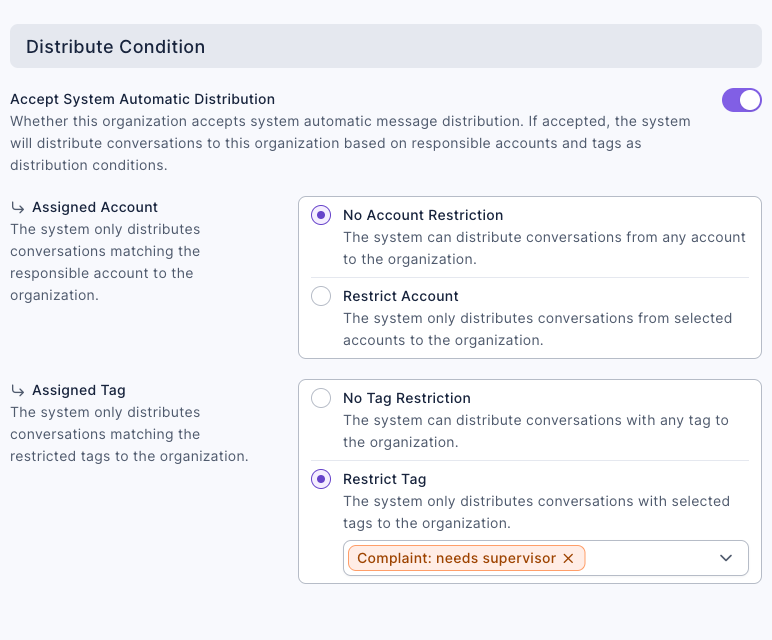
- In Distribute Condition, turn on Accept System Automatic Distribution. Under Assigned Tag, choose Restrict Tag and select "Complaint: needs supervisor".
- In Automation, set Resolved → Close to Automatically Close and enter 24 hours. Set Close → Change Organization to Change to Default Organization and Remove Agent, so that the next time this member asks a routine question, it doesn't land in the Complaints team again.
- Click Save.
The screenshot below shows the Complaints team's Distribute Condition: Accept System Automatic Distribution is on, and the Assigned Tag is restricted to "Complaint: needs supervisor".
For the full rules, see Understand how conversations are assigned to organizations and agents.
3. Catch complaint keywords with a chatbot
Under LINE › Chatbot, add a keyword chatbot named "Complaint to supervisor":
- In Trigger Keyword (Contains), enter "Complaints", "complaint", "refund", "return", "allergy" and "compensation", pressing Enter after each one (up to 20).
- Under Tag Settings, set Trigger Add Tag to "Complaint: needs supervisor".
- Under Follow-up Actions, turn on Service center transfer.
- On the Edit Message tab, add a text message: "We're sorry about your experience. We've passed you to a Sunleaf customer service supervisor, who will contact you personally within 1 business day. If you can, please share your order number and what happened, so the supervisor won't need to ask again."
- Click Save.
The screenshot below shows this chatbot's keywords, tag and follow-up action:
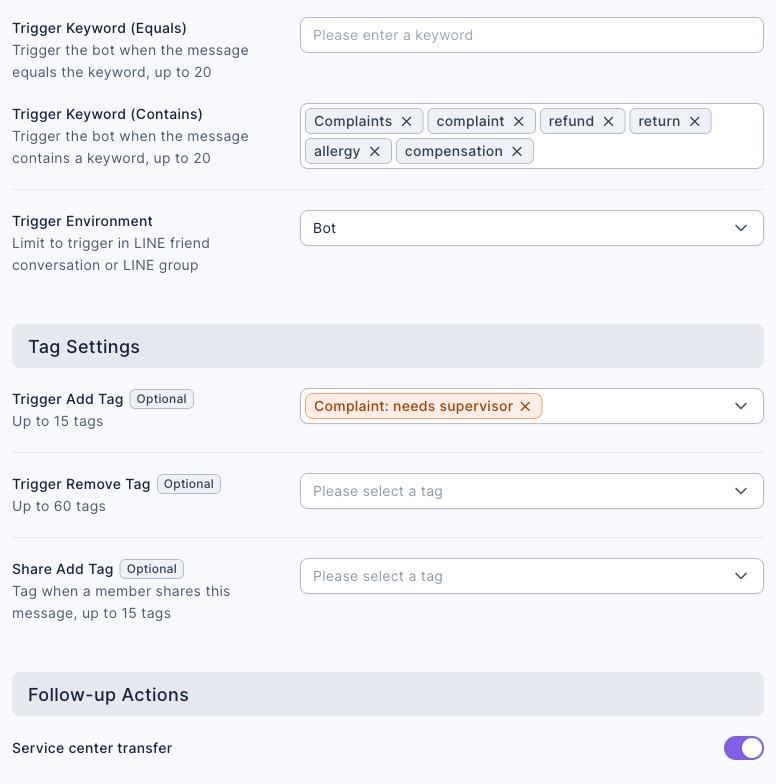
The chatbot applies the tag before it transfers the conversation, so assignment already sees "Complaint: needs supervisor" and the conversation goes straight to the Complaints team. For every setting, see Set up a LINE chatbot.
4. Supervisors pick it up in Service Center
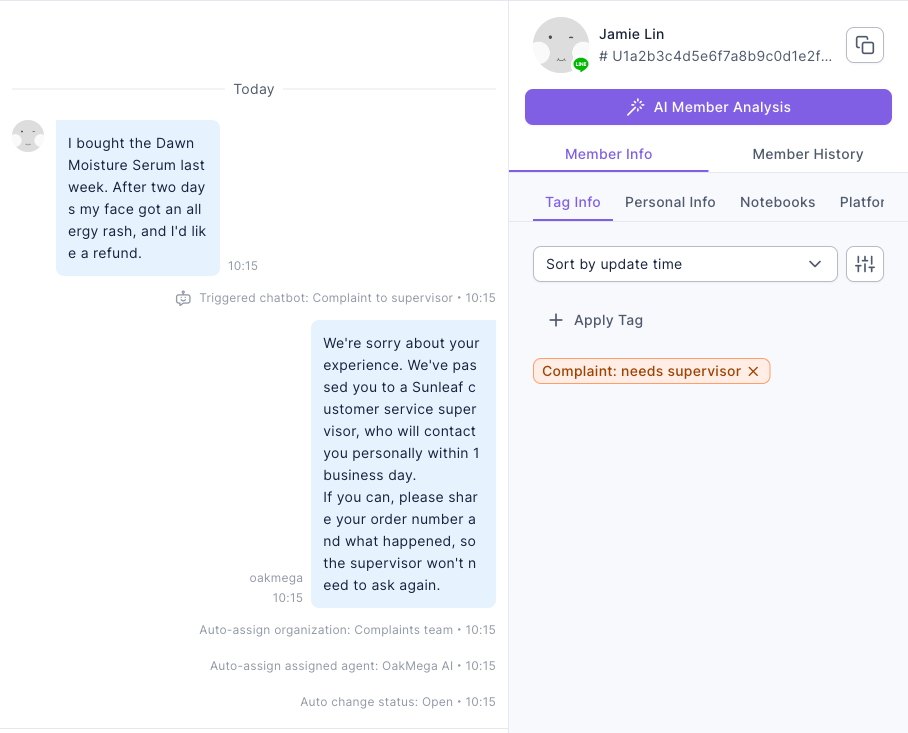
After the member sends a complaint, the Service Center conversation shows, in order, "Triggered chatbot: Complaint to supervisor", "Auto-assign organization: Complaints team", "Auto-assign assigned agent:" and "Auto change status: Open". The tag in Member Data on the right is "Complaint: needs supervisor".
When the supervisor is done:
- Under Tag Info in Member Data, remove "Complaint: needs supervisor" and apply "Complaint: resolved".
- Mark the conversation Resolved. After 24 hours it closes automatically and goes back to the default organization.
How it works and limits
| Situation | Result | What to do |
|---|---|---|
| A member mentions a complaint for the first time and the conversation isn't in service | Tagged, transferred to Service Center and assigned to the Complaints team | Nothing |
| The conversation is already in service (the member is talking to a regular agent) | The tag is applied, but the conversation isn't reassigned; it stays with its current organization and agent | Supervisors use the advanced filter on the tag "Complaint: needs supervisor" to find it and move it to the Complaints team by hand |
| The member also has another organization's assigned tag (for example, VIP members) | Several organizations match, so Multiple Organization Condition Match sends it to the default organization or a random matching one | Same as above: supervisors filter once a day, or have the VIP team's supervisor watch the complaint tag too |
| The message just happens to contain a keyword ("How do returns work?") | It still goes to a supervisor | Choose unambiguous keywords; supervisors move false alarms back to a regular organization and remove the tag |
| The chatbot has a Weekly Effective Period | It doesn't trigger outside those hours, so complaints aren't caught | Don't limit the complaint chatbot's hours; it still replies and transfers after hours, and the supervisor picks it up the next working day |
Keywords are matched with "Contains", regardless of context. The shorter the keyword, the more false alarms: "ill", for example, would also fire on "will" and "bill".
What members see
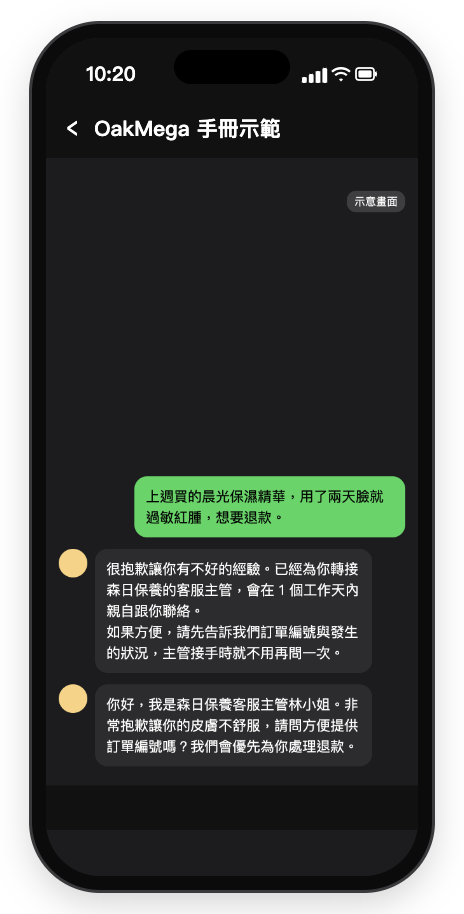
As soon as the member complains, the chatbot replies with an apology and a response time. When the supervisor picks it up, they reply from the same official account. The screen is a mock-up (Chinese demo).
The member writes "I bought the Dawn Moisture Serum last week. After two days my face got an allergy rash, and I'd like a refund." The chatbot replies with the apology above. Then Ms. Lin, Sunleaf's customer service supervisor, writes: "Hi, this is Ms. Lin, the customer service supervisor at Sunleaf. We're very sorry about your skin. Could you share your order number? We'll process your refund as a priority."
How to check it's working
| What you want to know | Where to look |
|---|---|
| How many complaints came in this month | The Total Number of Tagged People for "Complaint: needs supervisor" and "Complaint: resolved"; the Total Trigger Count of the "Complaint to supervisor" chatbot |
| Which complaints are still open | In Service Center, filter by the organization "Complaints team" and the statuses Open and In process |
| Whether any complaints landed in another organization | In Service Center, use the Advanced filter on the tag "Complaint: needs supervisor" and check the organization column |
| Whether supervisors have a backlog | In the Service Center Data Center, filter by the Complaints team and check Open and In process (it shows current counts only, not response times) |
Variations
- Let AI calm things down first: turn on Transfer to Agent → Enable AI Agent for the Complaints team, so AI collects the order number and photos before the supervisor takes over; see Let an AI agent handle an organization's conversations.
- Route by type: give health-related keywords such as "allergy" and "injury" a different tag and send them to the quality assurance team; send "refund" and "return" to the orders team.
- Follow up after the case is closed: a week later, post an article to members tagged "Complaint: resolved" to check in, with a make-good coupon attached.