
When a member is missing a tag they should have, first find out whether it was never applied or applied and then removed. The causes are completely different.
1. Check whether the tag was ever applied
- In the navigation bar, click LINE, choose Member Management, find the member and open their details on the right.
- Click Tag Info to see the tags they have right now.
- Click Member History to see the tag history, including whether the tag was ever applied and when it was removed.
To check many people at once, go to Member & Tag › Tag Management and choose Download Tag Record (up to 10,000 entries) from the tag's "⋯" menu.
| What you see | What it means | Go to |
|---|---|---|
| Member History shows it applied, then removed | It was applied, then removed by expiry, a remove-tag setting or a person | Section 2 |
| No record of it ever being applied | OakMega didn't know who it was, or the trigger didn't happen | Sections 3 and 4 |
| It was triggered a moment ago and isn't there yet | Tags are processed in the background and may still be queued | Section 5 |
2. It was applied, then disappeared
The expiry tag ran out
An Expiry Tag is removed automatically once its Expiry Time has passed. The screenshot below shows the Add Tag dialog. With Expiry Tag selected, you set the Expiry Time in days (up to 731) or hours (1–23).
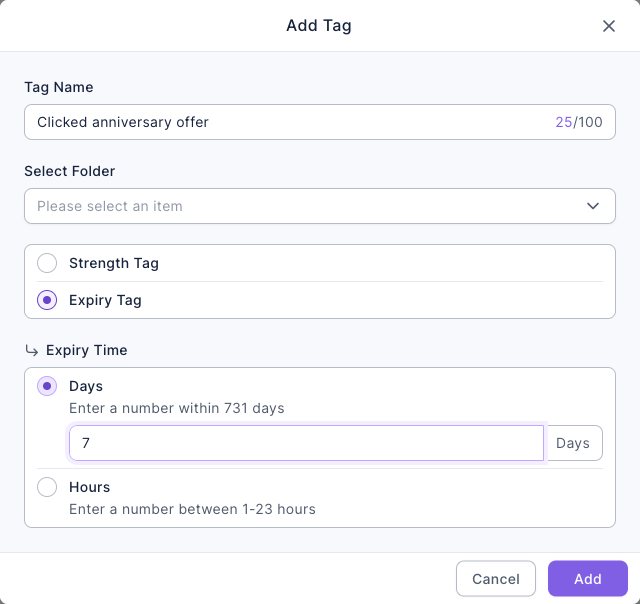
- The time counts from the last update of this tag on this member. If they get tagged again during that time, the clock restarts.
- The system checks for expired tags once an hour, so removal can happen a little after the expiry time.
- A very short expiry (say 1 hour) is often gone by the time you look. For long-term attributes, use a Strength Tag.
A setting removed it
- Chatbot remove tags: a chatbot can apply and remove tags at the same time. Check that this tag isn't on the remove side.
- Booking Center: booking completion and booking cancellation each have their own tags to apply and remove, so a cancelled booking can remove a tag applied when it was booked.
- Someone removed it by hand or with a batch action. Member History keeps a record.
The tag or folder was deleted
Deleting a tag removes it from every member, and deleting a folder deletes all the tags in it. There's no way to undo a deletion in the backend.
3. OakMega didn't know who it was
Links, forms and approved pages need to know which member it is before they can tag anyone. Anything that skips LINE login can only count clicks and won't apply tags:
| Source | Tags are applied | Tags aren't applied |
|---|---|---|
| Deep link | You shared the LINE Deep Link URL and the person went through LINE login | The General Deep Link URL, or the LINE login failed or was cancelled |
| Tag Routing Link | The person went through LINE login | Login failed or was cancelled |
| Form | Login via Communication Platform is on | Forms without login apply no tags at all: not on click, submit or answer |
| Approved page | Login to Communication Platform to View Page is on | Without login, people who view the page aren't tagged |
| New/Existing Friend Link (new friends) | They add you as a friend within 1 minute of clicking | They add you later than that; unblocking doesn't count as a new friend |
4. The trigger didn't happen
Tags are only applied when the action actually succeeds:
| Source | When the tag is applied | Common reasons it wasn't |
|---|---|---|
| Chatbot | When the chatbot is triggered | The chatbot didn't trigger (see A chatbot isn't replying); group chats never apply tags; messages from blacklisted members don't trigger chatbots |
| Form click tags | When the form opens and the person is allowed to fill it in | They don't meet the tag limits, aren't a friend, are outside the time window, or the submission limit is reached |
| Form submit and answer tags | When the form is submitted | They opened it but didn't submit |
| Pass | When a claim or use succeeds | The claim failed (see Members can't claim a pass), or the pass hadn't started or was already used |
| Booking Center | On booking completion or cancellation | Other status changes don't apply tags |
| Post interaction tags | When a friend taps the message in a real send | Taps on a test send don't apply tags |
5. It was just triggered and isn't there yet
Tags are written in the background, usually within seconds, but larger volumes take longer:
- Batch tagging from the member list is processed 2,000 members at a time, so a large batch can take a few minutes.
Wait a moment, then reopen the member's details.