
When a member says they can't get a pass, first find out which situation it is, then check the matching section:
- The pass isn't in their Wallet at all → section 2
- They can see it, but claiming fails → section 3
- You distributed it from the backend and they say they never got it → section 4
- They have it, but can't use it → section 5
1. Open the pass settings
- In the navigation bar, click Web-based Tool and choose Pass.
- Click the pass in the list. Pass information opens on the right.
- Click Show All at the bottom and look at Issuance settings, Claim settings and Usage settings.
The screenshot below shows the expanded pass information. Issuance settings has Issuance type and Wallet visibility. Claim settings has Claim Method, Claim period, Promo Code, Total passes and Per-person limit. Usage settings has Usage method and Usage period. Almost every cause below can be checked here.
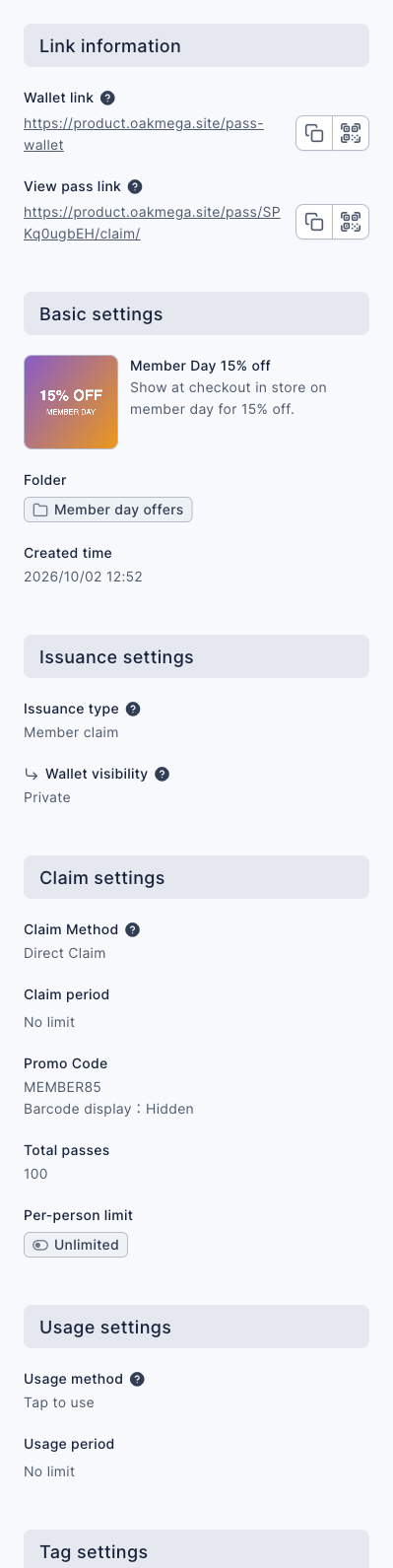
To see how many have been claimed, switch to the Pass statistics tab and compare the total with the number claimed.
2. The pass isn't in the Wallet
Members only see passes that are visible to them right now:
| Setting | Who can see it | Common cause |
|---|---|---|
| Wallet visibility Private | Only members it was given to | It wasn't given to this member; private passes never show up in anyone else's Wallet |
| Wallet visibility Limited to tagged members | Members with the required tags | They don't have the tag. With Must have all tags, they need every one. A tag added a moment ago can take a little while, so ask them to reopen the Wallet |
| All required tags were deleted | No one | When every required tag is deleted, the pass is hidden from everyone. Edit the pass and choose tags again |
| Now is outside the Claim period | Only during the period | The period hasn't started or has ended, so the pass disappears from the Wallet |
| The pass or its folder was deleted | No one | Deleted passes can't be viewed or used; deleting a folder deletes the passes in it |
- The View pass link only opens the pass. It doesn't bypass the limits above: a member who can't see the pass can't claim it from the link either.
- Download available member data in the "⋯" menu shows the Available member count, the number of members who can view and claim this pass in the Wallet. Use it to check whether this member is included.
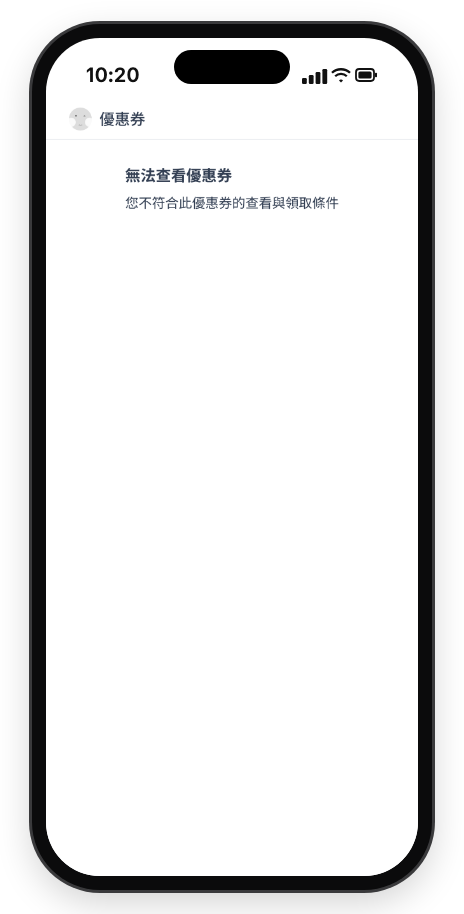
The link shows "Cannot view Pass"
If a member opens the View pass link and sees "Cannot view Pass" and "You do not meet the conditions to view or claim this Pass", the pass isn't visible to them right now, for one of the reasons in the table above. Most often the pass is tag-limited and they don't have that tag, or it's a private pass that was never distributed to them.
3. They can see it, but claiming fails
When a member taps claim, the system checks the following in order. If any one fails, they don't get the pass:
| Cause | How to check | What to do |
|---|---|---|
| All claimed | The number claimed in Pass statistics equals Total passes | Edit the pass and raise the total (it can only go up, never down) |
| Per-person limit reached | Per-person limit is set and they've already claimed that many | This is the limit working as intended; raise it if you want them to claim more |
| Not enough points | Claim Method is Points Redemption and their valid points are below the cost | Expired points don't count. Ask them to earn more, or offer a separate Direct Claim pass |
With Show Unique Promo Code, each member gets one of the codes you uploaded, so the pass runs out when the codes do. Promo code settings can't be changed after saving; if you need more, create a new pass and upload new codes.
4. You distributed it from the backend and they say they never got it
When the Issuance type is Backend distribution, members don't claim it. The system puts the pass straight into their Wallet, but sends no message about it, so they only see it when they open the Wallet themselves.
- Ask them to open the Wallet from the Wallet link in your Richmenu or a message.
- When you give out a pass with a LINE friend post and there aren't enough passes left, the post fails. See A post wasn't sent.
5. They have it, but can't use it
| Situation | Why |
|---|---|
| It's already marked used | Each pass can only be used once |
| It has expired | The Usage period has passed. "Within N days" counts from the moment this member got the pass |
| It can't be used yet | The usage period starts at a later time that hasn't arrived |
| Tapping use does nothing | When the Usage method is Enter code, they have to enter a code first |
Passes that were already claimed keep their old usage period, usage method and promo code. If a member claimed it before you changed the settings, their pass still follows the old ones.