
Every form restriction shows its own special page when it stops someone. Ask the member what the page says, and you'll know which setting blocked them.
1. Find the page the member sees
- In the navigation bar, click Web-based Tool, choose OakMega Form, click "⋯" at the end of the form's row and choose Edit.
- Switch to the Page Settings tab.
- Special Pages on the left lists the page shown for each kind of block. Click one to see and edit its content.
The screenshot below shows the Page Settings tab with Ineligible Submission Page selected. On the right is the default content people see: "Not qualified / Specific qualifications are required." A warning icon next to a page name means that, with the current settings, this page will never appear; open it to see why. Here the form has no tag restrictions, so it reads "Both required-tag and excluded-tag submission limits are currently unset, so this page will not appear". Use these hints to rule out causes that can't apply.
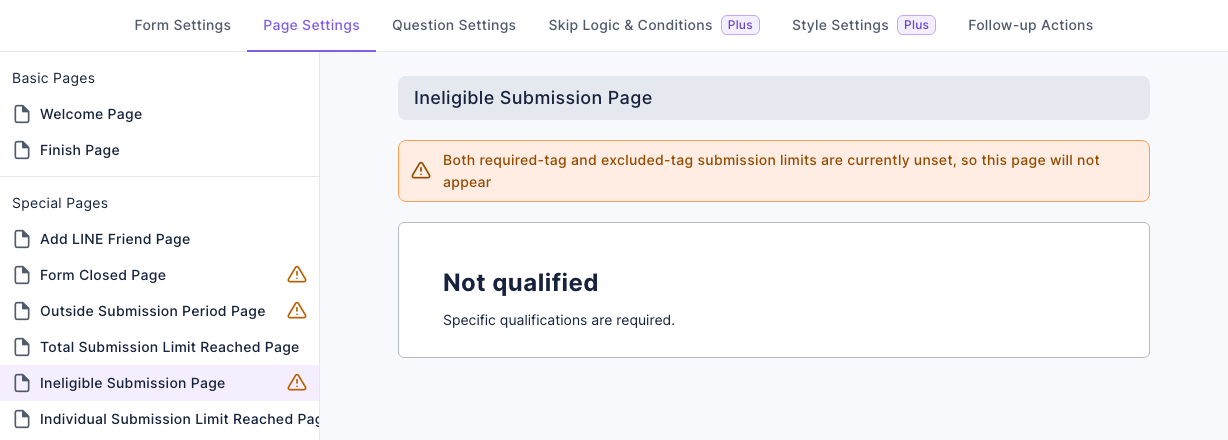
If you've changed the text on these pages, the member sees your version, so compare against your own settings.
2. Match the page to the cause
All of these settings are on the Form Settings tab:
| Page the member sees | Cause | What to do |
|---|---|---|
| Form Closed Page | Form Status is off | Turn Form Status on. If the switch is locked and shows "Form count exceeds limit", the workspace has more forms than its quota allows; delete extra forms first |
| Add LINE Friend Page | Add friend to fill form is on, and this member isn't a friend of your LINE Official Account or has blocked it | Ask them to add (or unblock) you, then open the form again |
| Outside Submission Period Page | It's outside the Submission Period | The deadline works to the minute, so people can still submit until the end minute is over. Extend it if needed |
| Total Submission Limit Reached Page | Responses to the whole form have reached Total Submissions | Raise the number. Responses submitted through the real link during testing count too; remove them with Clear |
| Individual Submission Limit Page | This member has reached Individual Submissions | This is the limit working as intended; raise it to let them submit again |
| Ineligible Submission Page | They don't meet Tag Restrictions to Write (missing a required tag; with "must have all", they need every one), or they have a tag in Exclude Tag Restrictions to Write | Check their tags in Tag Info on their member details; see A member didn't get tagged |
- Add friend, Individual Submissions and the tag restrictions only work with Login via Communication Platform on. Without login, none of them are checked.
- The first time a member opens a login-required form on a device, they see a login page and sign in with LINE before reaching the form.
3. Which page appears when several limits apply?
If the form requires login, the member signs in with LINE first. After login, the real link checks the conditions in the order below and shows the first special page that applies. Once you've fixed one restriction, reopen the real link to check for any others.
| Order | Page shown first | Condition |
|---|---|---|
| 1 | Form Closed Page | Form Status is off |
| 2 | Outside Submission Period Page | Outside the Submission Period |
| 3 | Ineligible Submission Page | Required tags are missing or excluded tags are present (login required) |
| 4 | Total Submission Limit Reached Page | Total Submissions is full |
| 5 | Individual Submission Limit Page | Individual Submissions is full (login required) |
| 6 | Add LINE Friend Page | The member hasn't added the LINE Official Account or has blocked it (login required) |
For example, if someone isn't a friend and the form's total limit is full, they see Total Submission Limit Reached Page after login. If the form is closed and its submission period has ended, they see Form Closed Page. This order describes the page shown when opening the form.
4. The test link works, but the real link doesn't
The Test link in the form's "⋯" menu skips every restriction. It opens even when the form is closed, and it saves no response and applies no tags. So a working test link doesn't mean the real one works. Before going live, open the real Form link once with a member account that meets the conditions.
5. Submitting fails after filling it in
When someone submits, the system checks the current form status, tags, friend status, submission period, total count and individual count again. A condition that changes while they are filling in the form can block submission. The submission checks follow a different order from the page display order above. Reopen the real link to see which special page currently appears. The total and individual counts are checked once more before saving the response so simultaneous submissions cannot exceed the limits.
If the form opens and the limits still pass, check the answers and setup:
| Situation | Why |
|---|---|
| A question is unanswered | A required question has no answer. Questions hidden by skip logic aren't checked |
| Wrong format | An answer doesn't match the question's format, such as a Regex check |
| Phone verification fails | The code expired or is wrong, or the number has already been verified by another member and can't be used again |
| The SMS code never arrives | If the screen shows "Failed to send SMS. Possible cause: insufficient SMS credits", the workspace hasn't connected an Every8d SMS account, or it ran out of credits and the SMS wasn't sent. Check the remaining points under Settings › Communication Platform Settings. If it shows "Exceeded send limit or reached daily send limit", each phone number and each member can request up to 10 codes a day, with at least 1 minute between requests. They can request again the next day |
| File upload fails | The form's file upload storage (Google Drive) isn't connected, has a connection problem, or is out of space |
| Booking fails | The booking item in the form couldn't be booked at submit time, for example the slot was just taken |
| The limit was just reached | Total or Individual Submissions hit the limit at the moment of submitting |